Rossmax HS200 Blood Glucose Monitoring System App for iOS and Android
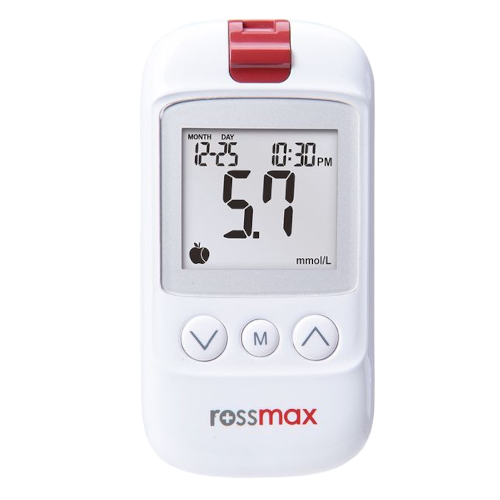
The Rossmax HS200 Blood Glucose Monitoring System is a portable, Bluetooth-enabled monitor designed for home use. The device is compatible with the MedM Health Diary app, allowing measurement results to be transferred automatically to a smartphone or tablet and accurately logged in the user’s health record.
When used with MedM, the captured readings can be reviewed in history lists and trend charts, helping users track patterns over time. The app also supports measurement and medication reminders, enabling more consistent self-monitoring routines. Data can be exported as CSV files, and registered MedM users are able to securely upload their records to the encrypted MedM Health Cloud for backup and long-term storage.
MedM Premium members gain access to additional features such as customisable goals, threshold notifications, PDF reports, data sharing and remote monitoring options, as well as synchronisation with other health ecosystems, including Apple, Google and Samsung.
MedM Health


Download MedM Health:
The Rossmax HS200 Blood Glucose Monitoring System is a portable, Bluetooth-enabled monitor designed for home use. The device is compatible with the MedM Health Diary app, allowing measurement results to be transferred automatically to a smartphone or tablet and accurately logged in the user’s health record.
When used with MedM, the captured readings can be reviewed in history lists and trend charts, helping users track patterns over time. The app also supports measurement and medication reminders, enabling more consistent self-monitoring routines. Data can be exported as CSV files, and registered MedM users are able to securely upload their records to the encrypted MedM Health Cloud for backup and long-term storage.
MedM Premium members gain access to additional features such as customisable goals, threshold notifications, PDF reports, data sharing and remote monitoring options, as well as synchronisation with other health ecosystems, including Apple, Google and Samsung.
How to Connect Rossmax HS200 with MedM App
- Open the app -> from the Tab Bar select Devices -> tap the "+" button to start Bluetooth discovery
- Press "M" to turn on your HS200 meter. When the meter is switched ON, hold the "M" button for 4 seconds to enter the pairing mode and wait for the Bluetooth symbol to start flashing
- Once the HS200 meter is discovered by the app - select it, configure device settings, and tap Add to My Devices
- Upon successful pairing a corresponding popup will appear
- The paired HS200 unit will be listed on the app's Devices screen
- The Bluetooth symbol will stop blinking once the meter is paired and history is transferred to the app
- Make a new measurement on the HS200 BGM to collect data in the app
Please note that the app has to be running in foreground or background (configurable in settings) to receive new readings from the blood blucose monitor.
Rossmax HS200 Characteristics
More info: www.rossmax.com


