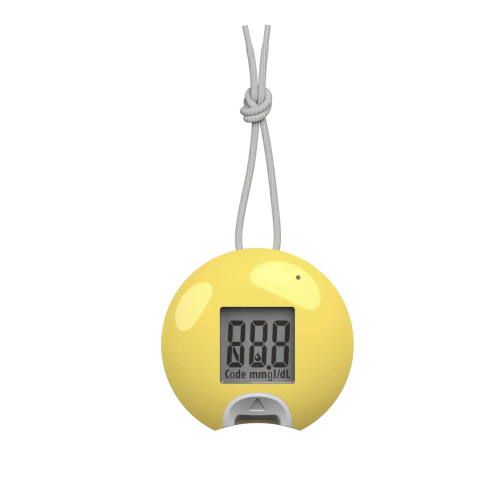
TaiDoc Technology TD-4266 Blood Glucose Meter Compatible App for iOS and Android
The TaiDoc TD-4266 Blood Glucose Meter works seamlessly with the MedM Health Diary app, enabling automatic collection, storage, and organization of blood glucose readings. Measurements performed with the TD-4266 unit can be transferred wirelessly to a smartphone or tablet via Bluetooth, helping users keep a complete and structured record of their glucose levels. Data of registered users is also securely backed up in the encrypted MedM Health Cloud for long-term tracking.
With MedM, users can schedule reminders for blood glucose testing or medication intake, analyze results using interactive charts with optional data aggregation, add notes and tags to each reading, and export measurements in CSV format. Premium users unlock advanced features such as personalized goals and thresholds, smart notifications for out-of-range values, PDF reports, secure data sharing, remote monitoring, and synchronization with major health platforms including Apple Health, Google Health Connect, and Samsung Health.
MedM Health


Download MedM Health:
The TaiDoc TD-4266 Blood Glucose Meter works seamlessly with the MedM Health Diary app, enabling automatic collection, storage, and organization of blood glucose readings. Measurements performed with the TD-4266 unit can be transferred wirelessly to a smartphone or tablet via Bluetooth, helping users keep a complete and structured record of their glucose levels. Data of registered users is also securely backed up in the encrypted MedM Health Cloud for long-term tracking.
With MedM, users can schedule reminders for blood glucose testing or medication intake, analyze results using interactive charts with optional data aggregation, add notes and tags to each reading, and export measurements in CSV format. Premium users unlock advanced features such as personalized goals and thresholds, smart notifications for out-of-range values, PDF reports, secure data sharing, remote monitoring, and synchronization with major health platforms including Apple Health, Google Health Connect, and Samsung Health.
How to Connect TaiDoc Technology TD-4266 with MedM App
- Open the MedM Health app → from the Tab Bar, go to Devices → tap the “+” icon to begin Bluetooth discovery
- Turn on the TD-4266 glucose meter. Bluetooth activation occurs automatically when the device is powered on
- When TD-4266 unit appears in the list of available devices → select it, review or adjust device settings if needed, then tap Add to My Devices
- A confirmation message will appear once pairing is completed successfully
- The connected TD-4266 BGM will now be visible on the Devices screen
- Perform a blood glucose test on the meter to sync new readings with the app
Notes: The app must be running in the foreground or background (configurable on settings) to receive new measurements.
TaiDoc Technology TD-4266 Characteristics
More info: taidoc.com


