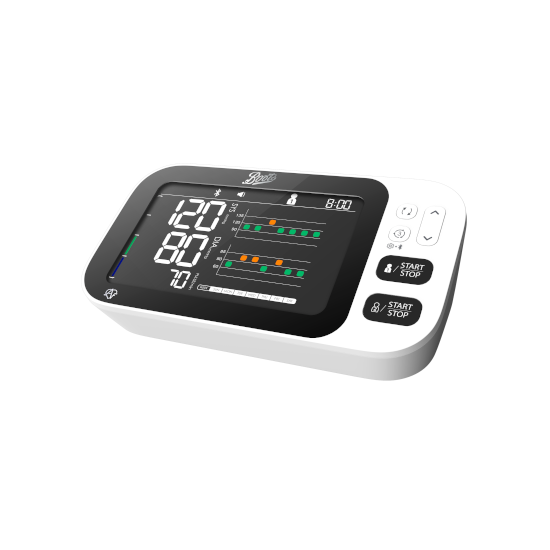
Boots Advanced Blood Pressure Monitor Connected App for iOS and Android
The Boots Advanced Blood Pressure Monitor is a Bluetooth-enabled upper arm meter that can connect to the MedM Health Diary app, making it easier to keep track of blood pressure readings over time. Once paired, measurements can be transferred wirelessly to a compatible smartphone or tablet, where users can conveniently record, organize, review, and manage their health data. Registered MedM users can also synchronize their readings with the encrypted and secure MedM Health Cloud for data backup and access across supported devices.
The Boots Advanced Blood Pressure Monitor supports monitoring for two users and a guest profile, with up to 250 stored readings. Its features include atrial fibrillation (AFib) indication, irregular pulse detection, body movement detection, average readings, and a universal cuff suitable for arm circumferences of 22–45 cm.
With the MedM app, users can view blood pressure history in charts, track changes over time, add notes and tags to measurements, and export their data as CSV files. All MedM users can also set reminders for blood pressure measurements and medication intake. Premium members get access to additional health management tools, including customizable goals, thresholds and notifications, PDF report export, access sharing for remote health monitoring, and synchronization with major health platforms such as Apple, Garmin, Google, and Samsung.
MedM Health


Download MedM Health:
The Boots Advanced Blood Pressure Monitor is a Bluetooth-enabled upper arm meter that can connect to the MedM Health Diary app, making it easier to keep track of blood pressure readings over time. Once paired, measurements can be transferred wirelessly to a compatible smartphone or tablet, where users can conveniently record, organize, review, and manage their health data. Registered MedM users can also synchronize their readings with the encrypted and secure MedM Health Cloud for data backup and access across supported devices.
The Boots Advanced Blood Pressure Monitor supports monitoring for two users and a guest profile, with up to 250 stored readings. Its features include atrial fibrillation (AFib) indication, irregular pulse detection, body movement detection, average readings, and a universal cuff suitable for arm circumferences of 22–45 cm.
With the MedM app, users can view blood pressure history in charts, track changes over time, add notes and tags to measurements, and export their data as CSV files. All MedM users can also set reminders for blood pressure measurements and medication intake. Premium members get access to additional health management tools, including customizable goals, thresholds and notifications, PDF report export, access sharing for remote health monitoring, and synchronization with major health platforms such as Apple, Garmin, Google, and Samsung.
How to Connect Boots Advanced Blood Pressure Monitor with MedM App
- Open the MedM Health app → go to the Devices section from the Tab Bar → tap the “+” button to start Bluetooth scanning
- Turn on the Boots Advanced Blood Pressure Monitor to activate its Bluetooth mode according to the device instructions
- Wait until the Boots Advanced Blood Pressure Monitor appears in the list of available devices in the app → select it and proceed with adding it to My Devices
- A confirmation message will appear once pairing is completed successfully
- The Boots Advanced Blood Pressure Monitor will be displayed in the Devices list as connected
- Perform a new measurement to verify that data is being transferred to the MedM app
Notes: The app must be running in the foreground or background (configurable in Settings) to receive new measurements.
Boots Advanced Blood Pressure Monitor Characteristics
Pulse: ±5%
More info: www.boots.com


