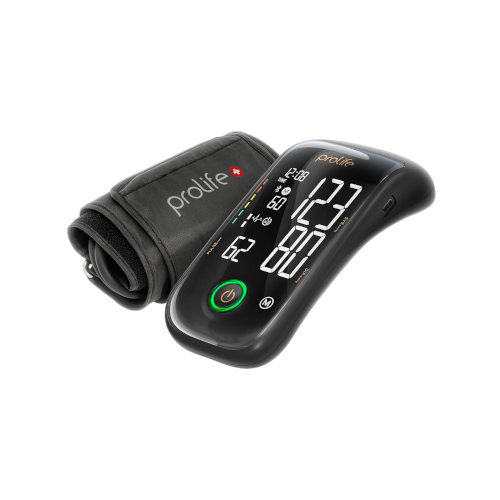
Prolife PX7 Premium BPM Compatible App for iOS and Android
The Prolife PX7 Premium upper-arm blood pressure monitor can be used with the MedM Health Diary app for iOS and Android. After Bluetooth pairing, measurements can be transferred to the user’s smartphone or tablet and saved in the MedM personal health record. Optionally, data can also be backed up to MedM Health Cloud.
The Prolife PX7 Premium uses the oscillometric method for blood pressure measurement. It includes Prolife AIM technology, which can personalise the measurement process for each user and may initiate additional measurement cycles based on pulse rate and pulse regularity, supporting a more comfortable measurement experience while maintaining measurement accuracy. The device also features Prolife Afibra® Smart technology designed to support early detection of atrial fibrillation (AF). The device has been clinically validated in accordance with ISO 81060-2:2018 + AMD1:2020 and AMD2:2024 in EU.
What you can do with the free MedM app (available to all users):
- Pair Prolife PX7 Premium with MedM via Bluetooth
- Sync and store blood pressure readings in the app
- View measurement history on a smartphone or tablet
- Export readings as a report file (for example, to send by email)
- Share the exported report with doctors, caregivers, or family members
MedM Premium features (optional):
- Shared access and remote monitoring (secure sharing with other trusted MedM users)
- Reminders, configurable thresholds and goals, and notifications
- Data synchronisation with other connected ecosystems, including Apple, Google, and Samsung
Data control and privacy
Users remain in control of their health data and can export their measurement history or delete their MedM record at any time. Data stored in MedM Health Cloud is encrypted and cannot be accessed by unauthorised third parties.
MedM Health


Download MedM Health:
The Prolife PX7 Premium upper-arm blood pressure monitor can be used with the MedM Health Diary app for iOS and Android. After Bluetooth pairing, measurements can be transferred to the user’s smartphone or tablet and saved in the MedM personal health record. Optionally, data can also be backed up to MedM Health Cloud.
The Prolife PX7 Premium uses the oscillometric method for blood pressure measurement. It includes Prolife AIM technology, which can personalise the measurement process for each user and may initiate additional measurement cycles based on pulse rate and pulse regularity, supporting a more comfortable measurement experience while maintaining measurement accuracy. The device also features Prolife Afibra® Smart technology designed to support early detection of atrial fibrillation (AF). The device has been clinically validated in accordance with ISO 81060-2:2018 + AMD1:2020 and AMD2:2024 in EU.
What you can do with the free MedM app (available to all users):
- Pair Prolife PX7 Premium with MedM via Bluetooth
- Sync and store blood pressure readings in the app
- View measurement history on a smartphone or tablet
- Export readings as a report file (for example, to send by email)
- Share the exported report with doctors, caregivers, or family members
MedM Premium features (optional):
- Shared access and remote monitoring (secure sharing with other trusted MedM users)
- Reminders, configurable thresholds and goals, and notifications
- Data synchronisation with other connected ecosystems, including Apple, Google, and Samsung
Data control and privacy
Users remain in control of their health data and can export their measurement history or delete their MedM record at any time. Data stored in MedM Health Cloud is encrypted and cannot be accessed by unauthorised third parties.
How to Connect Prolife PX7 with MedM App
-
Open the app → from the Tab Bar select Devices → tap the “+” button to start Bluetooth discovery.
-
Turn on the Prolife PX7 Premium and start a measurement (press ON/OFF to begin cuff inflation). While the monitor is waiting for connection, the Bluetooth symbol starts to flash.
-
Once the Prolife PX7 Premium is discovered by the app — select it, choose the data transfer mode (automatic / background, as offered by the app), then tap Add to My Devices.
-
Confirmation of successful Bluetooth pairing: The Bluetooth symbol is constantly lit on the monitor screen.
-
Take a new measurement on the Prolife PX7 Premium to send data to the app.
Please note that the app must be running in the foreground or background (depending on settings) to receive new readings from the blood pressure monitor.
Prolife PX7 Characteristics
Pulse: ±5%
More info: www.prolife-health.com


