Joytech DBP-6282B BPM Compatible App for iOS and Android
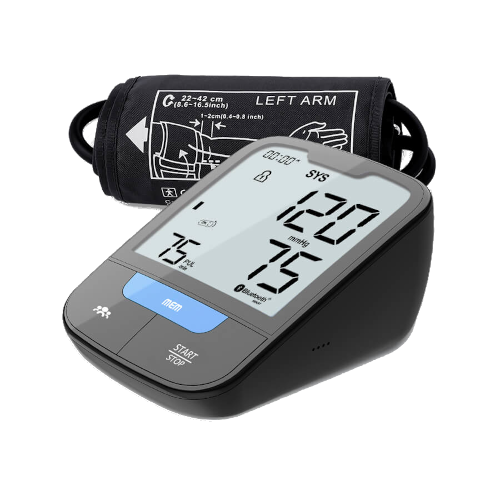
The CE-marked and FDA cleared smart Blood Pressure Monitor Joytech DBP-6282B by Sejoy is compatible with MedM health monitoring app and remote health monitoring platform. Readings can be captured via Bluetooth, saved to the user's smartphone or tablet and, optionally, backed up to MedM Health Cloud.
Users have full control over their health data: they can export their measurement history as a file, manage sharing permissions, or permanently delete records at any time. All data in the cloud is stored encrypted and cannot be accessed by an unauthorised third party.
The app enables setting reminders for regular blood pressure monitoring. Premium members can additionaly set goals, configure thresholds, customise notifications, and sync data with Apple Health, Samsung Health, and Health Connect.
MedM Health


Download MedM Health:
The CE-marked and FDA cleared smart Blood Pressure Monitor Joytech DBP-6282B by Sejoy is compatible with MedM health monitoring app and remote health monitoring platform. Readings can be captured via Bluetooth, saved to the user's smartphone or tablet and, optionally, backed up to MedM Health Cloud.
Users have full control over their health data: they can export their measurement history as a file, manage sharing permissions, or permanently delete records at any time. All data in the cloud is stored encrypted and cannot be accessed by an unauthorised third party.
The app enables setting reminders for regular blood pressure monitoring. Premium members can additionaly set goals, configure thresholds, customise notifications, and sync data with Apple Health, Samsung Health, and Health Connect.
How to Connect Joytech DBP-6282B BPM with MedM App
- Open the MedM Health app → from the Tab Bar, select Devices → tap the “+” button to start Bluetooth discovery
- On the DBP-6282B blood pressure monitor, press and hold the Start/Stop button until the Bluetooth symbol appears on the screen — this indicates the device is in pairing mode
- Wait until the DBP-6282B appears in the app’s list of available devices
- Select the DBP-6282B from the list → configure device settings if necessary → tap “Add to My Devices”
- Upon successful pairing, a confirmation popup will appear
- The paired DBP-6282B monitor will now be displayed in the Devices list
- Make a new measurement on the monitor to capture new data in the app
Note: The MedM Health app must be running in the foreground or background (depending on settings) to collect data from the DBP-6282B blood pressure monitor.
Joytech DBP-6282B BPM Characteristics
More info: www.sejoygroup.com


