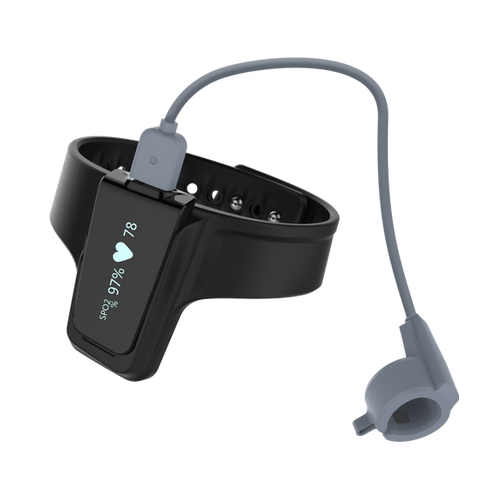
Wellue Checkme™ O2 Max Wrist Oxygen Monitor App for iOS and Android
The Wellue Checkme™ O2 Max 72-hour fingertip pulse oximeter is compatible with the MedM Health Diary app, enabling users to conveniently measure, record, and track their blood oxygen (SpO₂) and pulse rate data. All readings captured by the Checkme O2 Max can be transmitted to a smartphone or tablet via Bluetooth, and (for registered users) securely synchronized with the encrypted MedM Health Cloud for safe backup and long-term storage.
To support consistent self-monitoring, MedM users can set up reminders and receive notifications for taking SpO₂ measurements or performing other routine health checks.
For MedM Premium members, additional tools become available: personalized health goals, configurable thresholds and notifications, health data sharing and remote monitoring options, PDF reports, and seamless integration with major health ecosystems such as Apple Health, Google Health Connect, and Samsung Health.
MedM Health


Download MedM Health:
The Wellue Checkme™ O2 Max 72-hour fingertip pulse oximeter is compatible with the MedM Health Diary app, enabling users to conveniently measure, record, and track their blood oxygen (SpO₂) and pulse rate data. All readings captured by the Checkme O2 Max can be transmitted to a smartphone or tablet via Bluetooth, and (for registered users) securely synchronized with the encrypted MedM Health Cloud for safe backup and long-term storage.
To support consistent self-monitoring, MedM users can set up reminders and receive notifications for taking SpO₂ measurements or performing other routine health checks.
For MedM Premium members, additional tools become available: personalized health goals, configurable thresholds and notifications, health data sharing and remote monitoring options, PDF reports, and seamless integration with major health ecosystems such as Apple Health, Google Health Connect, and Samsung Health.
How to Connect Wellue Checkme™ O2 Max with MedM App
- Open the MedM Health app → from the bottom tab bar, select Devices
- Tap the “+” button to start Bluetooth discovery
- Power on your Checkme O2 Max Wellue oximeter and make sure the Bluetooth icon is flashing — this indicates that the device is ready to pair
- Once Checkme O2 Max appears in the list of discovered hardware, select it and tap Add to My Devices
- Confirm any pairing request if prompted on your screen
- When the pairing is successful, a confirmation popup will appear in the app
- The paired Checkme O2 Max Wellue oximeter will now be visible on the Devices screen
- Start a new measurement on the device to collect new data in the app
Wellue Checkme™ O2 Max Characteristics
PR Accuracy: ±2bpm or ±2%, whichever is greater
More info: getwellue.com


